


In this chapter we will inspect Android application without necessarily running it.
This is called static analysis: examining the application's files, compiled code, configuration and resources to understand what it does.
What is static analysis?
Imagine you have an android application, but you don't know how it was written.
You want to answer questions such as:
- Does it communicate with a server using HTTP or HTTPS?
- Does it contain hardcoded credentials or cryptographic keys?
- Does it store sensitive information insecurely?
- Can another app invoke its screens without logging in?
- Does it expose a content provider that reveals private data?
You could install and interact with the app, but you could also examine its compiled package.
static analysis follows this general workflow:
Obtain APK
|
v
Extract package contents
|
v
Decode manifest and resources
|
v
Decompile application code
|
v
Search for suspicious patterns
|
v
Trace the relevant code
|
v
Validate the potential finding
The final step is crucial. A suspicious string or exported component is a lead, not necessarily a confirmed vulnerability.
Three Ways to inspect an APK
Manual introduces three main approaches.
Approach A – Unzip the APK
Best for understanding package structure.
unzip InsecureBankv2.apk -d insecurebank_unzippedThis extracts files that are already present in the archive. Some resources and the manifest may remain in binary or compiled formats.
Try to open the AndroidManifest.xml and other files.
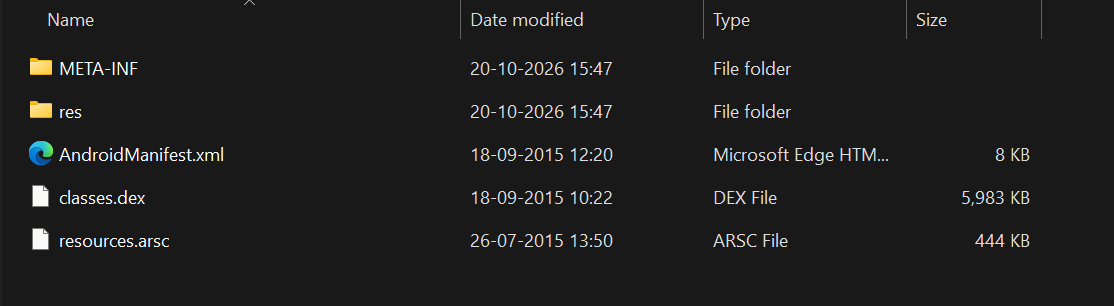
Result:
Some of the files will not be in human readable format (e.g., AndroidManifest.xml).
Approach B – Apktool (apk to Smali)
Best for resources, manifest analysis and Smali
First install the Apktool from this website: https://apktool.org/docs/install/
apktool d InsecureBankv2.apk -o insecurebankv2_disassembledOutput:
apktool d InsecureBankv2.apk -o insecurebankv2_disassembled
I: Using Apktool 3.0.3 on InsecureBankv2.apk with 8 threads
I: Loading resource table...
I: Baksmaling classes.dex...
I: Decoding value resources...
I: Loading resource table from file: C:\Users\manis\AppData\Local\apktool\framework\1.apk
I: Decoding file resources...
I: Generating values XMLs...
I: Decoding AndroidManifest.xml with resources...
I: Copying original files...
I: Copying unknown files...
Press any key to continue . . .
It decodes supported resourcs and the manifest, and disassembles DEX into Smali.
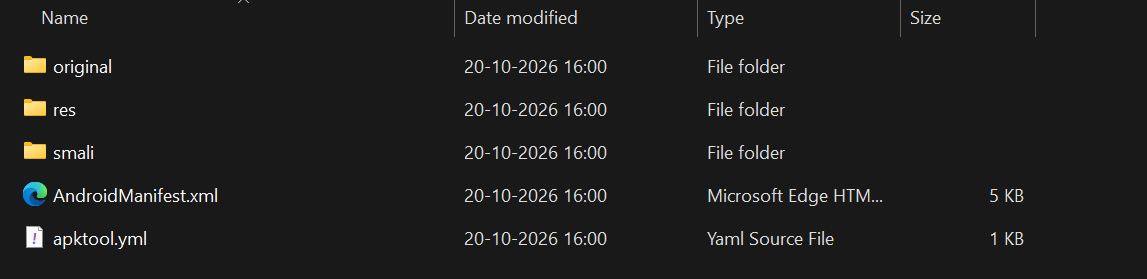
Result:
apktool not only extract the files but decompiles them into human readable format. Now we can read the AndroidManifest.xml and all other xml files.
Note:
apktool decompiles the source code into smali code (bytecode) which is still not proper human readable code.
Approach C – JADX
Download the JADX from this link: https://github.com/skylot/jadx/releases
Best for reading reconstructed Java-like code.
jadx -d insecurebankv2_java InsecureBankv2.apkOutput:
jadx -d insecurebankv2_java InsecureBankv2.apk
INFO  - loading ...
INFO  - processing ...
INFO  - done
JADX attempts to reconstruct readable source code from compiled DEX. The output is an approximation, not the original source project.
Reading the AndroidManifest.xml
This is one of the most valuable file in the apk, it is the map of the apk.
It describes the package and declares important parts of the app's integration with Android, including permissions, activities, services, receivers and providers.
For example, a manifest might contain:
<uses-permission android:name="android.permission.INTERNET"/>
    <uses-permission android:name="android.permission.WRITE_EXTERNAL_STORAGE"/>
    <uses-permission android:name="android.permission.SEND_SMS"/>
    <uses-permission android:name="android.permission.USE_CREDENTIALS"/>
    <uses-permission android:name="android.permission.GET_ACCOUNTS"/>
    <uses-permission android:name="android.permission.READ_PROFILE"/>
    <uses-permission android:name="android.permission.READ_CONTACTS"/>
    <android:uses-permission android:name="android.permission.READ_PHONE_STATE"/>
    <android:uses-permission android:maxSdkVersion="18" android:name="android.permission.READ_EXTERNAL_STORAGE"/>
    <android:uses-permission android:name="android.permission.READ_CALL_LOG"/>
    <uses-permission android:name="android.permission.ACCESS_NETWORK_STATE"/>
    <uses-permission android:name="android.permission.ACCESS_COARSE_LOCATION"/>
These declarations request particular capabilities; they do not automatically mean the application can exercise every capability without further checks.
A permission declaration also does not prove that the app actually use the permission at runtime.
How should a security analyst review permissions?
Ask three questions for every sensitive permission:
- Is it necessary for the app's stated functionality?
- Where in the code is the capability used?
- Is the sensitive data handled securely after access is granted?
For example, a contacts application might legitimately need contacts access. A simple calculator requesting contacts and call-log permissions would deserve closer investigation.
The presence of a permission is a clue. Its context determines whether it represents a security concern.
Debugging and backups
The training APK includes manifest settings such as:
<application android:allowBackup="true" android:debuggable="true" These attributes have different meanings:
android:debuggable="true"allows supported debugging workflows that would normally be restricted for a production application.android:allowBackup="true"indicates that the app permits certain Android backup mechanisms, subject to OS version, target, SDK, device configuration and backup rules.
Exported components: an application's attack surface
An android application may contain activities, services, receivers, and providers that other apps can interact with.
The collection of reachable interfaces forms part of its attack surface.
For example:
Android application
|
+--- LoginActivity
|
+--- ViewStatement
|
+--- ChangePassword
|
+--- ContentProvider
|
+--- BackgroundService
Imagine that ViewStatement is intendend to be available only after loging.
If the activity is externally reachable and relies only on the normal login screen to enforece authentication, another app migh invoke it directly.
The security issue is not simply that the activity is exported. It is that the sensitive operation may lack the authorization checks it requires.
<activity android:label="@string/title_activity_file_pref" android:name="com.android.insecurebankv2.FilePrefActivity" android:windowSoftInputMode="adjustNothing|stateVisible"/>
        <activity android:label="@string/title_activity_do_login" android:name="com.android.insecurebankv2.DoLogin"/>
        <activity android:exported="true" android:label="@string/title_activity_post_login" android:name="com.android.insecurebankv2.PostLogin"/>
        <activity android:label="@string/title_activity_wrong_login" android:name="com.android.insecurebankv2.WrongLogin"/>
        <activity android:exported="true" android:label="@string/title_activity_do_transfer" android:name="com.android.insecurebankv2.DoTransfer"/>
        <activity android:exported="true" android:label="@string/title_activity_view_statement" android:name="com.android.insecurebankv2.ViewStatement"/>
        <provider android:authorities="com.android.insecurebankv2.TrackUserContentProvider" android:exported="true" android:name="com.android.insecurebankv2.TrackUserContentProvider"/>
        <receiver android:exported="true" android:name="com.android.insecurebankv2.MyBroadCastReceiver">
Automated Static Analysis from APKs
1 Qark
Install qark using pip:
pip install qarkCheck installation:
qark --version
qark, version 4.0.0
qark --apk .\InsecureBankv2.apk2 MobSF to Decompile and Scan APK's
Install MobSF
Make sure docker is installed.
docker pull opensecurity/mobile-security-framework-mobsf:latestStart it:
docker run -it --rm -p 8000:8000 opensecurity/mobile-security-framework-mobsf:latestUse it:
http://127.0.0.1:8000Visit this in the browser and default credentials are as follows:
Username: mobsf
Password: mobsf
Then browse the apk in the file uploader in the page.
From the Android Manifest Analysis Section:
We can see that several activities have been exposed. We can manually try to exploit this by calling the activity directly from adb:
Command:
adb shell am start -n "com.android.insecurebankv2/com.android.insecurebankv2.DoTransfer"
Starting: Intent { cmp=com.android.insecurebankv2/.DoTransfer }
This will show this activity in the device.

Join the discussion
Sign in with your account to post comments, reply to others, and participate in the conversation.
Login to Comment