


Understanding How the Modern Internet Was Born
When most developers think about the internet, they imagine websites, APIs, browsers, cloud servers, and mobile applications. But beneath all of these technologies lies a protocol so fundamental that modern computing would look completely different without it: HTTP.
HTTP is not merely a protocol for loading websites. It is the communication language of the modern web. Every image loaded in a browser, every API request from a mobile application, every authentication flow, every cloud service interaction, and every distributed microservice call depends on the ideas that HTTP introduced.
To truly understand HTTP, we first need to understand the evolution of the web itself.
The Difference Between the Internet and the Web
One of the most common misconceptions is treating the Internet and the Web as the same thing.
They are not.
The Internet
The Internet is the global network infrastructure.
It includes:
- Routers
- Fiber cables
- Switches
- Satellite systems
- Data centers
- TCP/IP networking
The Internet is the physical and logical network that allows computers to communicate globally.
Think of it as:
The road system of global communication.
The World Wide Web
The Web is an application built on top of the Internet.
It consists of:
- Websites
- Web pages
- Hyperlinks
- Browsers
- HTTP
The Web introduced:
- Universal resource access
- Hyperlinked documents
- Browser-based navigation
Think of it as:
A transportation service running on the road system.
The Internet existed before the Web.
The Web simply made the Internet usable for ordinary humans.
The Problem Before HTTP
Before the Web existed, accessing information over networks was difficult.
Systems used protocols like:
- FTP (File Transfer Protocol)
- Gopher
- Telnet
These systems had major limitations:
- No standardized document linking
- Difficult navigation
- Poor user experience
- No universal document format
- Fragmented communication standards
The internet was mostly used by researchers, universities, and government institutions.
It lacked:
- Simplicity
- Accessibility
- Interconnected information
The world needed a universal system for sharing and navigating documents.
The Birth of the World Wide Web
The Web was invented by Tim Berners-Lee in 1989 while working at CERN.
His vision was revolutionary:
Create a system where documents across the world could be linked and accessed universally.
This idea introduced three fundamental technologies:
1. HTML — HyperText Markup Language
HTML provided a standard way to structure documents.
It allowed:
- Headings
- Paragraphs
- Links
- Images
Most importantly:
- Documents could reference other documents.
This created the idea of hypertext.
2. URL — Uniform Resource Locator
URLs gave every resource a unique address.
Example:
https://example.com/articles/httpThis solved a major problem:
How do we uniquely identify resources across the globe?
URLs became the universal addressing system of the Web.
3. HTTP — HyperText Transfer Protocol
HTTP became the communication protocol for transferring web resources.
It defined:
- How clients request resources
- How servers respond
- How resources are identified
- How communication should occur
This protocol became the foundation of the Web.
Early Web Architecture
The early Web followed a simple architecture.
Components
Client
Usually a browser.
Server
Hosts resources.
Protocol
HTTP.
The Client-Server Model
HTTP adopted the client-server architecture.
- Client Responsibilities
- Initiate communication
- Request resources
- Render responses
- Server Responsibilities
- Store resources
- Process requests
- Send responses
This separation introduced massive scalability advantages.
Servers could serve many clients independently.
Why HTTP Was Revolutionary
HTTP introduced several powerful ideas simultaneously.
1 Simplicity
HTTP was intentionally designed to be simple.
A request looked like this:
GET /index.htmlThat simplicity enabled:
- Easy implementation
- Rapid adoption
- Cross-platform interoperability
2 Statelessness
One of the most important design decisions was making HTTP stateless.
This means:
Every request is independent.The server does not automatically remember:
- Previous requests
- User identity
- Application state
This was extremely important for scalability.
A server could process millions of independent requests without maintaining persistent client memory.
This single design choice helped the Web scale globally.
3 Resource-Oriented Communication
HTTP treats everything as a resource.
Examples:
- HTML page
- Image
- Video
- API response
- CSS file
- JSON object
Resources are identified using URLs.
This resource-oriented model later influenced:
- REST APIs
- Microservices
- Cloud architectures
HTTP/0.9 — The First Version
The first version of HTTP was incredibly minimal.
Features:
- Only GET method
- Only HTML responses
- No headers
- No status codes
Example:
GET /index.htmlThe server simply returned raw HTML.
- There was no metadata.
- No content types.
- No caching.
- No authentication.
It was extremely primitive.
But it proved the concept worked.
Why HTTP/0.9 Could Not Scale
As the web evolved:
- content types diversified,
- browsers became more advanced,
- interoperability challenges emerged.
Servers needed ways to communicate:
- content format,
- response status,
- caching behavior,
- authentication requirements.
HTTP required metadata.
This led to HTTP/1.0.
HTTP/1.0 — The Web Begins to Grow (Metadata-Driven Communication)
As the Web expanded, HTTP needed improvements.
HTTP/1.0 introduced:
- Headers
- Status codes
- Content types
- Multiple response formats
Example:
HTTP/1.0 200 OK
Content-Type: text/html
This changed everything.
Now the Web could support:
- Images
- Videos
- Different document formats
- Rich metadata
The browser became far more powerful.
The Explosion of the Web
In the 1990s, the Web experienced explosive growth.
Websites became:
- Interactive
- Media-rich
- Commercialized
New problems emerged:
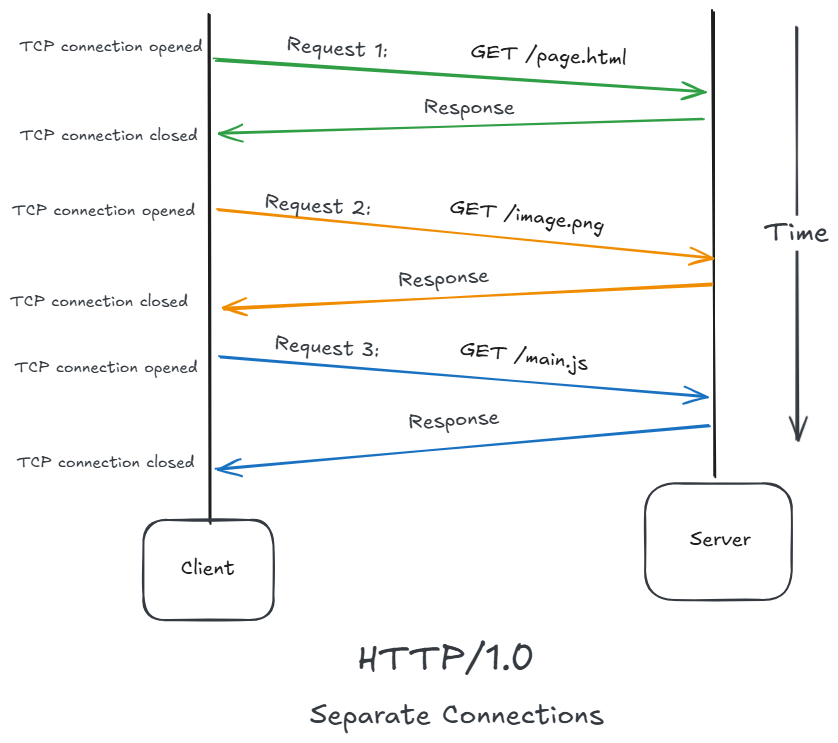
- Slow performance
- Repeated TCP connections
- Network congestion
- Scalability bottlenecks
HTTP needed to evolve again.
As each request required:
- a new TCP handshake,
- new congestion window initialization,
- repeated latency overhead.
TCP's Hidden Cost
HTTP relies heavily on TCP.
TCP provides:
- reliability,
- ordering,
- retransmission,
- congestion control.
But TCP initialization is costly.
Each new connection required:
TCP 3-way Handshake
- SYN
- SYN-ACK
- ACK
Additional TLS handshakes increase latency further.
Repeated connections became a major bottleneck.
Drawbacks of HTTP/1.0
1 Non-Persistent Connections
Every file requires a new TCP connection:
Problem:
- Slow performance
- More network overhead
2 No Host Header Requirement
Virtual hosting was difficult because multiple websites could not easily share one IP address.
3 High Latency
Repeated connection setup increases delay.
HTTP/1.1 — The Long-Standing Standard
HTTP/1.1 became one of the most influential protocol versions ever created.
HTTP/1.1 addressed connection inefficiency.
Major innovation:
Persistent connections.
It introduced:
- Persistent connections
- Keep-alive
- Chunked transfer encoding
- Host headers
- Better caching support
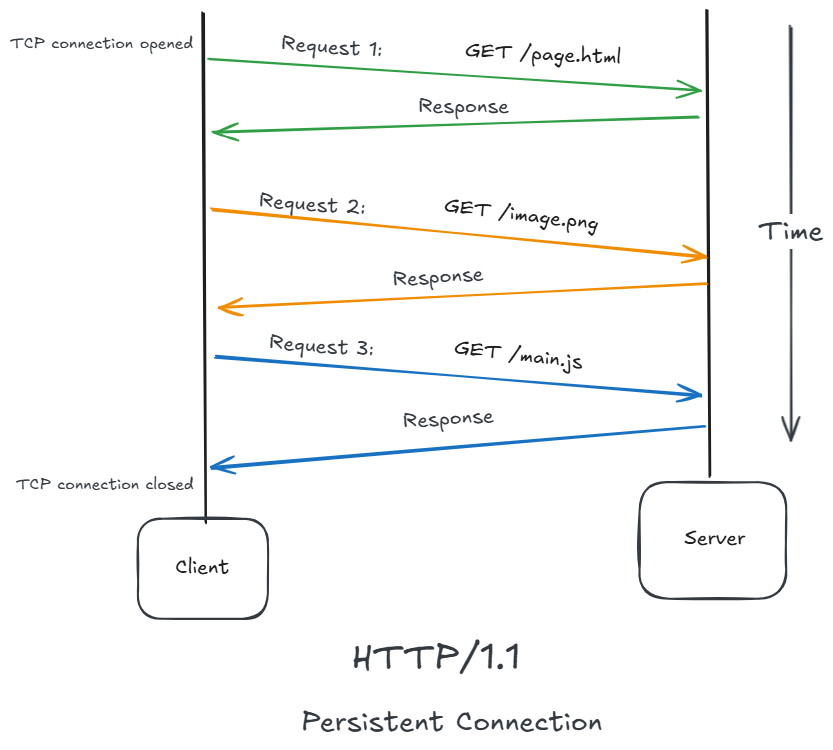
Persistent Connections
Previously:
- Every request opened a new TCP connection.
This was inefficient because TCP handshakes are expensive.
HTTP/1.1 allowed:
Multiple requests over the same connection.
This reduced:
- Latency,
- handshake overhead,
- Network congestion,
- server resource consumption.
Important Features of HTTP/1.1
1 Persistent Connection
Default behvaior is connection reuse
2 Host Header Support
Example:
Host: example.comAllows many websites on one IP address (virtual hosting).
3 Chunked Transfer Encoding
Server can send data in chunks when total size is unknown.
Example:
Transfer-Encoding: chunkedUseful for:
- Streaming
- Dynamic content
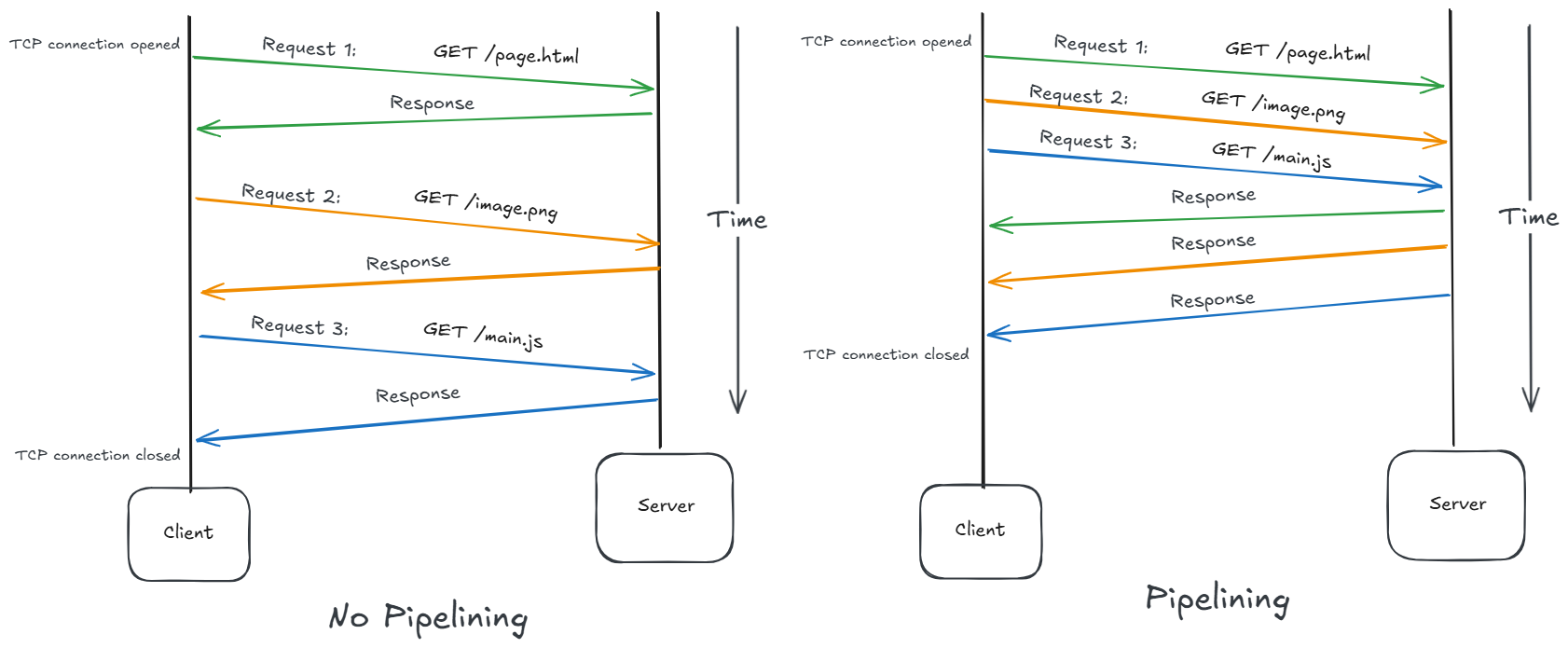
4 Pipelining
Client can send multiple requests without waiting for earlier responses.
Request1
Request2
Request3
Server replies in order.
(Not widely used due to blocking issues.)
5 Better Caching Support
Supports headers like:
- Cache-Control
- ETag
- If-Modified-Since
Improves webpage loading speed.
Host Header and Virtual Hosting
Before HTTP/1.1, the server usually could not tell which website the browser wanted if multiple websites shared the same IP address.
The Problem Before Host Header
Imagine a server machine with:
- example.com
- shop.com
- blog.com
All hosted on the same physical serve.
Suppose all three domains point to the same IP:
203.0.113.10Now the browser connects:
GET /index.html HTTP/1.0Notice:
- no domain name inside request
- only path is sent
The TCP connection only knows:
destination IP = 203.0.113.10But the server asks:
“Which website do you want?”
It cannot know whether:
example.comshop.comblog.com
was requested.
Result Before HTTP/1.1
Typically:
1 IP address = 1 websiteHosting providers needed:
- many public IPs
- expensive infrastructure
This limited shared hosting.
HTTP/1.1 Solution: Host Header
HTTP/1.1 added:
Host: example.comNow request becomes:
GET /index.html HTTP/1.1
Host: example.com
The browser explicitly tells the server:
“I want example.com”
What Happens Internally
Suppose this server hosts:
| Domain | Directory |
|---|---|
| example.com | /var/www/example |
| shop.com | /var/www/shop |
| blog.com | /var/www/blog |
All share the same IP:
203.0.113.10Server receives:
GET / HTTP/1.1
Host: shop.com
Web server software (Apache/Nginx) checks:
Host = shop.comThen routes requests to:
/var/www/shopThis is called Virtual Hosting.
Virtual Hosting
One physical server behaves like multiple virtual websites.
Why “Virtual” Hosting?
Because:
- physically -> one machine
- logically -> many websites
The server creates “virtual hosts.”
Example in Nginx:
server {
    server_name example.com;
    root /var/www/example;
}

server {
    server_name shop.com;
    root /var/www/shop;
}
The Host header determines which config block handles request.
Why This Was Revolutionary
Without Host header:
1000 websites -> 1000 IP addressesWith Host header:
1000 websites -> maybe 1 server + 1 IPHuge cost reduction.
Why Shared Hosting Became Cheap
Hosting companies could now:
- rent one large server
- host thousands of websites
- all using same IP
Customers paid very little.
This created:
- cheap web hosting
- explosion of small websites
- blogging platforms
- Wordpress hosting industry
The Problem of Head-of-Line Blocking
Even with improvements, HTTP/1.1 still had a major limitation.
Head-of-line (HOL) blocking is a situation where one request, packet, or message at the front of a queue delays everything behind it, even if the later items could otherwise be processed.
Requests were processed sequentially on a connection.
If one request became slow:
- Everything behind it waited.
This became known as:
Head-of-Line Blocking.
Modern web pages loaded:
- Images
- CSS
- JavaScript
- Fonts
- Ads
- Analytics
Browsers started opening multiple TCP connections simultaneously to work around the problem.
This increased complexity and inefficiency.
HTTP/1.1 Pipelining
HTTP/1.1 introduced pipelining to reduce waiting time (latency).
The client could send multiple requests without waiting for earlier responses.
Example:
Client sends:
Req1
Req2
Req3
But the server had to return responses in the same order.
Res1
Res2
Res3
Client Server
GET /a ---------------->
GET /b ---------------->
GET /c ---------------->
<--------------- Response A
<--------------- Response B
<--------------- Response CIf Res1 is slow means delayed, then:
Res2andRes3are blocked- This is called Head-of-Line (HOL) Blocking
Req1 → slow response ❌
Req2 → waiting
Req3 → waiting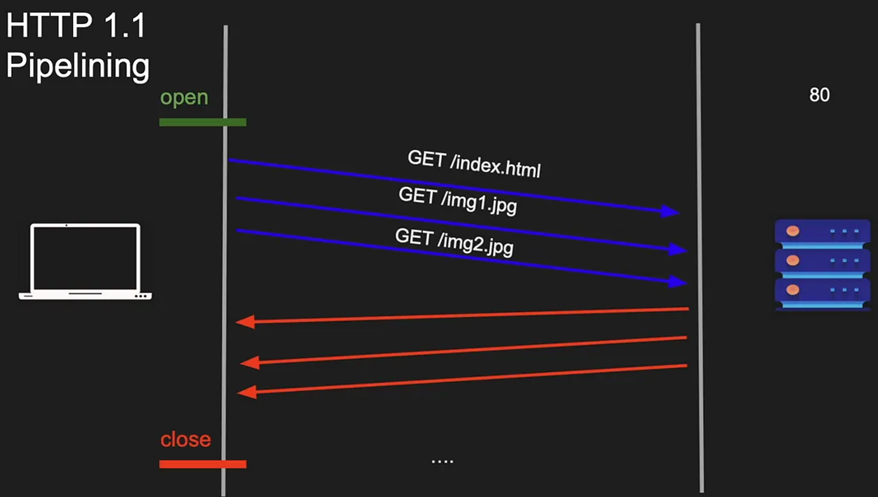
For Example:
Imagine that, the HTML is so large, so it took time, but the image is tiny.
- The server can't respond with the image first, because if it does, then the client think that the first response corresponds to the first request and in that situation, the image will be rendered as the HTML and things will break.
- So, what the server does is, it goes sequential. Even if the image is small one, still it will actually block the image until the HTML is loaded and then it will respond with the image. This actually defeats the whole purpose of the pipeline.
- Plus, if there is a proxy right in the middle, we can't guarantee that, the proxy in the middle will guarantee the order.
Therefore, nobody actually uses pipelining on HTTP/1.1. It is disabled by default because it can become messy too easily.
The Problem: Responses Must Stay Ordered
HTTP/1.1 requires responses to be returned in the same order as requests.
Suppose:
GET /large-image
GET /profile
GET /notifications
The server cannot send /profile before /large-image completes.
Request 1 -> slow
Request 2 -> fast
Request 3 -> fast

Response 1 -> waiting
Response 2 -> blocked
Response 3 -> blocked
That's classic head-of-line blocking.
Even though Request 2 and 3 could be processed quickly, their responses are stuck behind Response 1.
Why Browsers Mostly Disabled Pipelining
Pipelining caused practical issues:
- Some proxies handled it incorrectly
- Some servers had buggy implementations
- Head-of-line blocking still existed
- Error recovery became more complicated
As a result, browsers usually preferred:
Connection 1 -> Request A
Connection 2 -> Request B
Connection 3 -> Request C
Opening multiple TCP connections was often more effective.
Instead of:
1 TCP connectionbrowsers often used:
Connection 1 -> image
Connection 2 -> css
Connection 3 -> js
Connection 4 -> api
Now a slow request on one connection doesn't block requests on the other.
This was the practical workaround before HTTP/2.
The Real Difference
Without pipelining:
Blocking occurs before requests are sent.With pipelining:
Blocking occurs when responses are returned.HTTP/2 — A Massive Architectural Shift
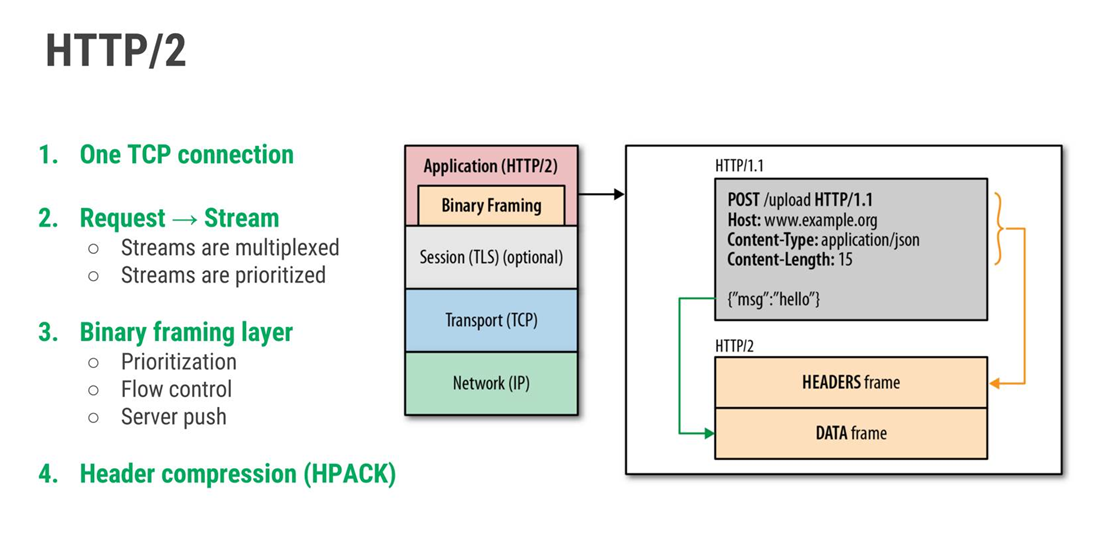
HTTP/2 was designed to solve HTTP/1.1 inefficiencies.
It introduced:
Binary Framing
HTTP messages were no longer plain text.
They became binary frames.
Benefits:
- Faster parsing
- Efficient transmission
- Better multiplexing
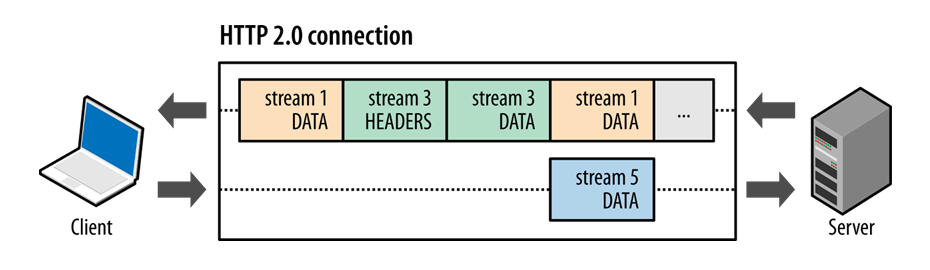
Multiplexing
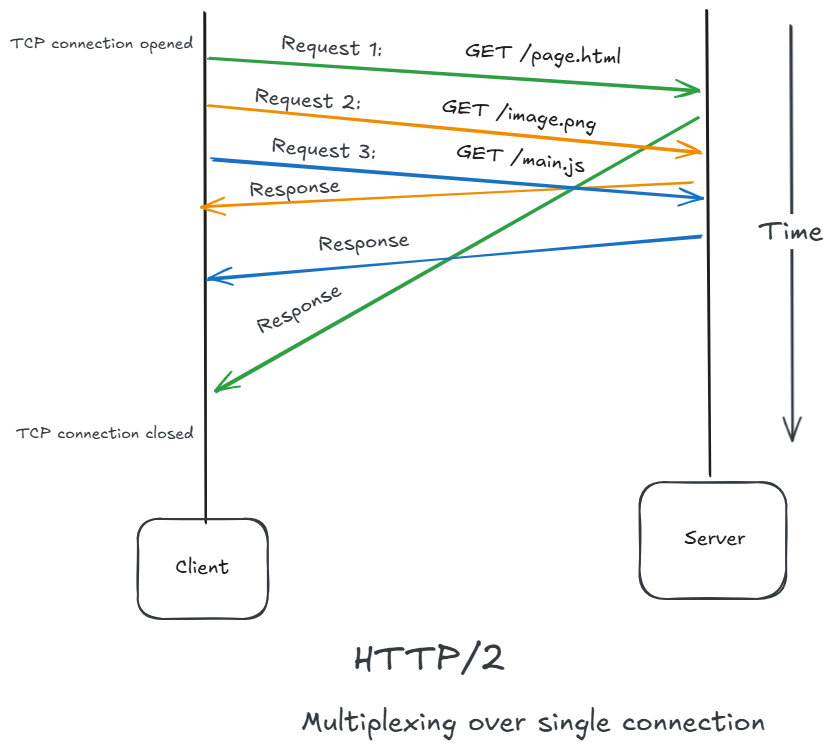
Multiple requests could share a single connection simultaneously.
No more sequential blocking.
In HTTP/1.1:
- One request blocks others on same connection.
In HTTP/2:
- Multiple requests and responses travel simultaneously.
This dramatically improved:
- Performance
- Parallelism
- Resource loading speed
Header Compression
Headers were often repetitive.
HTTP/2 introduced HPACK compression.
This reduced bandwidth consumption significantly.
Server Push
Server can send resources before browser requests them.
Example:
When browser requests HTML,
server automatically pushes:
- CSS
- JS
without waiting.
Browser requests HTML
Server sends:
   ├── HTML
   ├── CSS
   ├── JS
Why HTTP/2 Was Important
HTTP/2 transformed web performance.
Websites became:
- Faster
- More efficient
- Better optimized for modern applications
It was one of the biggest performance upgrades in web history.
Limitations of HTTP/2
1 TCP Head-of-Line Blocking
Although HTTP/2 multiplexes streams,
TCP itself still blocks if packets are lost.
HTTP/3 — Moving Beyond TCP
Even HTTP/2 had limitations because it still relied on TCP.
TCP suffers from transport-level head-of-line blocking (TCP Head-of-Line Blocking)
TCP Head-of-Line Blocking
If one packet is lost:
- TCP stops delivery of all streams
- Even unrelated data waits
This cause delays.
HTTP/3 introduced a radical change:
Replace TCP with QUIC over UDP.What is QUIC?
QUIC is a transport protocol built over UDP.
What is RTT?
Round-Trip Time (RTT) is the time taken for a packet to go from client -> server -> back to client.
It measures network latency.
Simple Example:
Suppose:
- Your browser sends a request to a server.
- Server replies back.
If total time is:
50 msthen:
RTT = 50 millisecondsVisualization:
Client  ─────► Server
        Request

Client ◄───── Server
        Response
Total travel time = RTT.
Why RTT matters
Every network handshake needs RTTs.
More RTTs means:
- slower page loading
- slower HTTPS setup
- more latency
Reducing RTT usage is a major goal of HTTP/3 and QUIC.
Traditional HTTPS Connection
Older HTTPS setup required:
1 TCP Handshake
Client → SYN
Server → SYN-ACK
Client → ACK
This costs:
1 RTT2 TLS Handshake
Then TLS security negotiation happens.
Usually another:
1 or 2 RTTsTotal:
2-3 RTT before actual website dataThat is expensive on high-latency networks.
What is 1-RTT?
1-RTT means:
Connection established in 1 round tripQUIC + TLS 1.3 combine transport and encryption handshakes together.
So:
Client → Initial packets
Server → Response + crypto
After one round trip:
- secure connection ready
- data transfer starts
1-RTT flow
Client ─────► Server
       Handshake

Client ◄───── Server
       Handshake Response

Secure connection established
Only one round trip needed.
What is 0-RTT?
0-RTT means:
Client sends application data immediately
WITHOUT waiting for handshake completion
This works only for:
- previously visited servers
- resumed sessions
How 0-RTT works
When you connect first time:
- server gives session information/tickets
Next time:
Browser already knows:
- encryption parameters
- session keys
So it can immediately send:
GET /index.htmlwithout waiting.
0-RTT Flow:
Client ─────► Server
   Handshake + Actual Data together
Server can process instantly.
This removes startup delay.
Why QUIC Matters
QUIC introduced:
- Faster handshakes
- Stream independence
- Improved packet recovery
- Better mobile performance
- Connection migration
This made modern applications:
- More resilient
- Faster on unstable networks
- Better suited for mobile devices
HTTP/3 represents the future of web transport.
Working of HTTP/3
Step 1: Connection Using QUIC (UDP)
Instead of TCP handshake:
HTTP/3 uses QUIC over UDP.
Traditional TCP + TLS:
TCP Handshake
    ↓
TLS Handshake
    ↓
HTTP Communication
HTTP/3 with QUIC:
QUIC + TLS Together
        ↓
HTTP/3 Communication
This reduces connection setup time.
Step 2: Secure Connection
QUIC has built-in TLS 1.3 encryption.
So:
- Security is integrated directly
- No separate TLS layer needed
Usually runs on:
- UDP port 443
Step 3: Multiplexed Streams
Like HTTP/2, HTTP3 supports multiple streams.
Example:
Single QUIC Connection
   ├── Stream 1 → HTML
   ├── Stream 2 → CSS
   ├── Stream 3 → JS
   ├── Stream 4 → Images
Step 4: Independent Stream Delivery
This is the major improvement.
In HTTP/2:
- Packet loss blocks all streams.
In HTTP/3:
- Only affected stream waits.
- Other streams continue normally.
Example:
Stream 1 packet lost
   ↓
Only Stream 1 pauses

Streams 2, 3, 4 continue working
This removes TCP head-of-line blocking.
Step 5: Faster Data Transfer
QUIC supports:
- Faster recovery from packet loss
- Better congestion control
- Reduced latency
Useful for:
- Video streaming
- Gaming
- Mobile networks
Why HTTP Became Universal
HTTP succeeded because it was:
- Simple
- Extensible
- Stateless
- Flexible
- Human-readable
- Platform-independent
Over time, HTTP evolved beyond web pages.
Today it powers:
- REST APIs
- Mobile apps
- IoT devices
- Cloud systems
- Microservices
- Streaming platforms
- Authentication systems
HTTP became the universal communication protocol of modern computing.
The Rise of APIs
Originally, HTTP was primarily for documents.
Modern systems transformed it into:
A machine-to-machine communication protocol.Now HTTP transports:
- JSON
- XML
- Binary payloads
- GraphQL queries
- Authentication tokens
This shift enabled:
- SaaS platforms
- Cloud-native systems
- Distributed architectures
Resource-Oriented Thinking
One of the deepest concepts introduced by HTTP is:
Everything is a resource.
This philosophy shaped:
- REST architecture
- URL design
- API modeling
- Cloud resource management
Examples:
/users
/products
/orders
/videos
Each resource:
- Has identity
- Has representation
- Can be manipulated
This became foundational to modern backend engineering.
Why Statelessness Scaled the Internet
Statelessness is one of the most important reasons the Web scaled globally.
Statelessness means:
The server does not inherently remember previous requests.
Each request contains all required context.
Because requests are independent:
- Servers can be replaced easily
- Load balancers can distribute traffic freely
- Horizontal scaling becomes simpler
Without statelessness:
- Large-scale cloud systems would be much harder
Modern distributed systems still heavily depend on this principle.
Why Stateful Systems Scale Poorly
Imagine if server had to remember:
- every user,
- every interaction,
- every navigation state.
Problems emerge immediately:
- memory growth,
- synchronization complexity,
- failover difficulty,
- horizontal scaling challenges.
HTTP avoided this problem early.
Statelessness and Horizontal Scaling
Because requests are independent:
- any server can handle any request,
- load balancing becomes easier,
- failover becomes simpler,
- caching becomes practical.
Modern cloud architecture still depends heavily on this principle.
Even today:
- REST,
- microservices,
- serverless systems,
- CDN edge architectures.
inherit HTTP's stateless philosophy.
HTTP as a Resource-Oriented Protocol
HTTP introduced a fundamental abstraction:
Everything is a resource.
This seems obvious today, but it was revolutionary.
Resources could represent:
- documents,
- images,
- videos,
- API entities,
- services,
- computations.
URI vs URL vs URN
Many developers incorrectly use these interchangeably.
1 URI (Uniform Resource Identifier)
A URI is the generic identifier for a resource.
It can identify:
- where the resource is located
- or what the resource is named
So, URI is the parent concept.
Syntax:
scheme:[//]somethingExamples:
https://example.com/users/1
mailto:john@example.com
urn:isbn:9780134685991
All of these are URIs.
2 URL (Uniform Resource Locator)
A URL is a type of URI that tells:
- where the resource is
- and how to access it
It includes:
- protocol/scheme
- host/domain
- optional port
- path
- query params
- fragment
Example:
https://www.example.com/products?id=10Breakdown:
https-> protocolwww.example.com-> host/products-> path?id=10-> query parameter
Real-world analogy:
A URL is like:
“Go to this building using this road.”
3 URN (Uniform Resource Name)
A URN is also a type of URI, but it identifies a resource by a unique name, not by location.
It does not tell where the resource exists.
Example:
urn:isbn:9780134685991This identifies a specific book by ISBN.
Even if the book moves servers or websites, the URN stays the same.
Real-world analogy
A URN is like:
“This person's Aadhar number.”
It identifies uniquely, regardless of location.
Relationship
URI
├── URL
└── URN
The Browser Changed Everything
Browsers became universal runtime environments.
They abstracted:
- Networking
- Rendering
- Hyperlink navigation
- Resource loading
The browser turned the internet from a technical network into a global information platform.
Modern Web Architecture
Today’s web architecture includes:
- Browsers
- APIs
- Reverse proxies
- CDNs
- Load balancers
- Microservices
- Edge computing
Yet the foundation remains the same:
Client requests resources using HTTP.Final Thoughts
The evolution of HTTP is not just the story of a protocol.
It is the story of how humanity built a universal information system.
HTTP transformed:
- Research networks into the modern Web
- Documents into interconnected resources
- Browsers into application platforms
- Servers into global-scale systems
From a tiny text-based protocol to the backbone of cloud computing, HTTP has continuously evolved to meet the growing demands of the internet.

Join the discussion
Sign in with your account to post comments, reply to others, and participate in the conversation.
Login to Comment