


Before Docker, Kubernetes, and cloud platforms like AWS reshaped how we build and deploy systems, software deployment was a manual, fragile, and infrastructure-heavy process. Understanding this era is critical for system designers, because many modern problems, abstractions, and best practices exist specifically to fix this pain points of traditional deployment.
This article explores how applications were deployed before containers and before cloud computing, what architectures looked like and why the industry was forced to evolve.
What “Deployment” Meant Traditionally
In traditional systems, deployment primarily meant:
Copying application code to a physical or virtual server, configuring the operating system and runtime manually, and starting the application as a long-running process.
Deployment was tightly coupled to:
- Physical machines or static virtual machines
- Operating system configuration
- Manually installed dependencies
- Environment-specific setup
There was no standardized packaging format, no orchestration layer, little automation.
Traditional developers used to buy physical server for deployment their application.
The Physical Server Era (Bare Metal Deployment)
In deployment consistency is important, the code should behave same in the server like it behaves in the local machine.
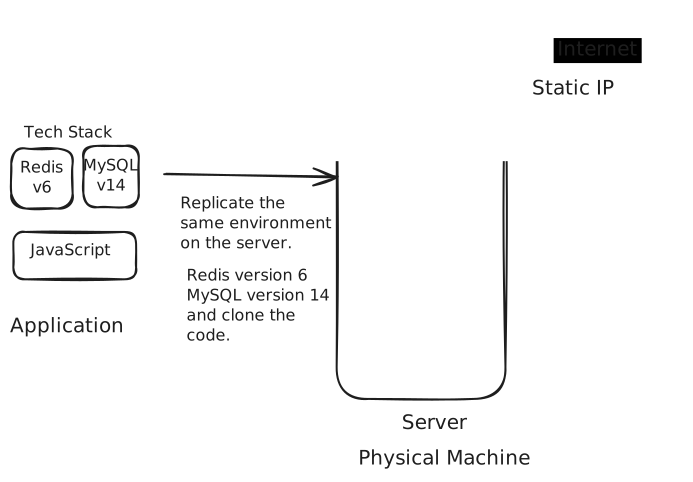
Early production systems ran on bare-metal servers located in on-premise data centers.
Typical setup:
- One application per server
- Fixed CPU, RAM, and disk
- Manual OS installation
- Manual application deployment
Deployment Workflow
- Procure hardware (Physical or rent out the hosting)
- Install operating system manually
- Install language runtime (Java, PHP, Python, etc.)
- Install system libraries
- Copy application code via FTP, copying, or Github
- Modify config files
- Restart the application
Each step was human-driver and error-prone.
Things to Consider
- Consistency: In order to app to work fine in the server, we have to provide the same environment in the server as that of the local.
- Highly Available: Server should be publicly available all the time, for the users to access.
Because of these things deployment strategies evolve overtime.
Dependency Hell
One of the biggest problems was dependency coupling with the OS.
Example:
- App A needs Java 7
- App B needs Java 8
- OS supports only one default Java version
Result:
- Application conflicted with each other
- Teams avoided co-locating apps
- Servers were underutilized
This led to the common rule:
One server, one application
Which massively increased infrastructure costs.
Environment Drift
A famous phrase from this era:
“It works on my machine.”
Why it happened
- Developer machines ≠ staging ≠ production
- Different OS versions
- Different library versions
- Different environment variables
Since environments were configured manually, they slowly diverged over time, causing unpredictable failures.
Manual Scaling and Capacity Planning
Now suppose your application is doing good, and its traffic increased to some point that your single server can't handle the increased traffic. In that case you have two options:
Vertical Scaling:
- Adding more RAM or CPU
- Like initially you have 4GB RAM and 2cpu
- Then you upgrade to the 8GB RAM and 4cpu.
- and so on.
- Buying a bigger server
This required downtime and had physical limits, also requires a dedicated person to do so.
Horizontal Scaling:
Horizontal scaling was possible but painful:
- Buying a new server
- Manually configure it
- Deploy application
- Register it with the load balancer
This process could take days, making rapid growth nearly impossible.

Join the discussion
Sign in with your account to post comments, reply to others, and participate in the conversation.
Login to Comment