


APIs can be designed and implemented in different architectural styles. Each style has its own principles, strengths, and trade-offs. Choosing the right styles depends on the system's requirements, such as performance, flexibility, scalability, and developer experience.
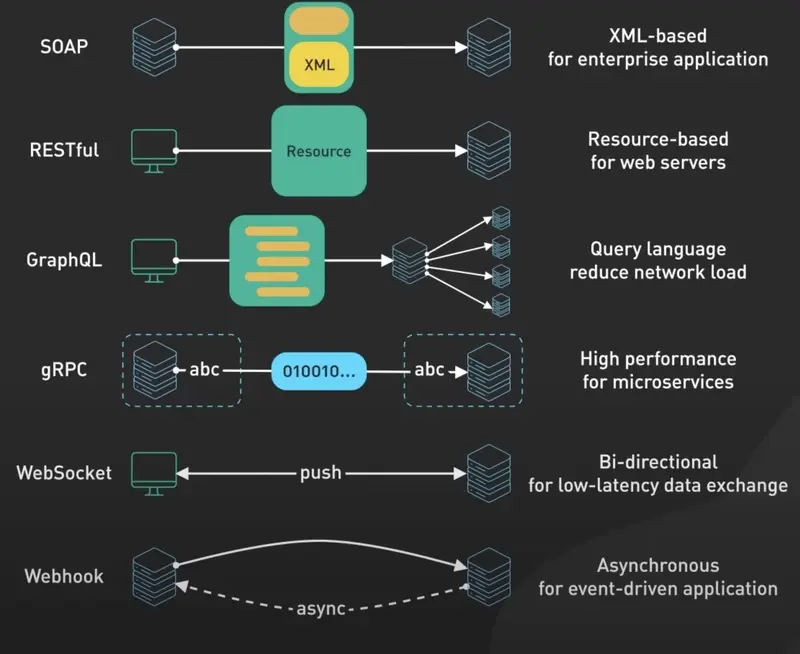
1️⃣ REST (Representational State Transfer)
This is most widely used API style. It is based on resources (users, order, products). Resources are just our core entities.
It uses plural names.
+--------+                               +--------+
| Client | --------HTTP Request--------> | Server |
+--------+ <-------HTTP Response-------- +--------+
It uses HTTP verbs for operations:
GET: ReadPOST: CreatePUT/PATCH: UpdateDELETE: Remove
Example:
GET /api/v1/users/123Response:
{
  "id": 123,
  "name": "TheJat",
  "email": "thejat@example.com"
}
Sample:
GET /events 	           # Get all events
GET /events/{id}           # Get a specific event
GET /venues/{id}           # Get a specific venue
GET /events/{id}/tickets   # Get available tickets for an event
POST /events/{id}/bookings  # Create a new booking for an event
GET /booking/{id}          # Get a specific booking

NOT:
POST /events/create ❌ No verbs
REST resources should represent things in your system, not actions. Instead of thinking about what users can do (like “book”, or “purchase”), think about what exists in your systems (events, venues, tickets, bookings).
Resource should always be plural nouns, i.e., bookings, events, tickets, etc.
HTTP Methods
GET is for retrieving data without changing anything. Use GET for /events/{id} to fetch event details or /events to list all events.
POST creates new resources. When a user books tickers. We would POST to /events/{id}/bookings with the booking details in the request body. The server assigns an ID and returns the newly created booking. POST is neither safe nor idempotent. In other words, calling it multiple times creates multiple bookings.
PUT replaces an entire resource with what you send, or creates it if it doesn't exist. If you are updating a user's profile completely. PUT to /users/{id} with the full user object. Unlike POST, PUT is idempotent, so sending the same data multiple times results in the same final state.
PATCH updates part of resource. When a user changes just their email address, PATCH to /users/{id} with only email field. Unlike PUT, PATCH is not guaranteed to be idempotent – the result depends on how you implement it. A PATCH that says “set email to this” is idempotent, but an PATCH that says “append to list” is not.
DELETE removes a resource. DELETE /bookings/{id} cancels a booking. It's idempotent because repeated calls leave the server in the same state (the resource stays deleted), even if the response codes differ (first call might return 204, subsequent calls might return 404).
The key here is idempotency, meaning whether repeated requests leave the server in the same state. GET, PUT, and DELETE are idempotent because calling them multiple times doesn't change the final result. POST and PATCH are not guaranteed to be idempotent, which matters when networks fail and clients retry requests. You don't want duplicate bookings from a retry.
Relationships:
A relationship describes how one resource is associated with another resource.
Imagine you are building an e-commerce application. It has users, orders, products, payments, and addresses. These resources are not independent: a user places orders, an order contains products, and an order may have a payment.
Nested URLs or Independent Resources?
Suppose a customer has several orders.
There are two common ways to expose them.
Option A: Nested resource
GET /customers/42/ordersOption B: Top-level collection with filtering
GET /orders?customerId=42Both can be good designs.
When should you use nested URLs?
Nested URLs are useful when the context of the parent matters.
For example:
GET /courses/101/modulesThis asks for modules belonging to course 101.
Similarly:
GET /projects/50/tasksThis asks for taks in project 50.
A nested endpoing is especially appropriate when the child is dependent on the parent or is only accessible in that parent's context.
When should you use independent resource URLs?
Suppose a module has its own indentifier and clients need to access it directly.
GET /modules/201
PATCH /modules/201
DELETE /modules/201
This avoids forcing every operation to include the course identifier, particularly when the module can be referenced independently.
A good design could offer both:
GET /courses/101/modules
GET /modules/201
The first provides contextual access. The second provides direct access to the module.
Avoid deeply nested URLs
Consider this endpoint:
GET /customers/42/orders/501/items/9001/productThis is difficult to maintain because it encodes a long chain of relationships in the URL.
It also creates unnecessary coupling. If the business relationship changes, clients may have to change the way the way they address resources.
A simpler design is:
GET /customers/42/orders
GET /orders/501
GET /orders/501/items
GET /products/77
Passing Data to APIs:
API endpoints need input to tell the server what to do. This can be which resources to fetch, what data to update in the database, or how to filter results.
We have three main options for passing data to REST API, and each serves a different purpose.
Path Parameters:
It identify which specific resource you are working with. When you want to get event details you put the event ID in the path: /events/123. This ID is part of the URL structure itself, making it clear that you are asking for specific event, not a collection of events. Use path parameters when the value is required to identify the resource – without it, the request doesn't make sense.
Query Parameters:
It filters, sort, or modify how you retrieve resources. When you want to search for events in a specific city or date range, you use query parameters: /events?city=CAL&date=2026-01-01. These are optional, you could ask for all events without any filters, or apply multiple filters together. Query parameters work well for pagination too: /events/page=2&limit=20. Npte the first option is separated via a ? and all subsequent parameters are separated by &.
Request Body:
It contains the actual data you are sending to create or update resources. When a user books tickets, you POST to /events/{id}/bookings with the details in the request body. Things like how many tickets, seating preferences, and so on. The request body is where you put complex data structures and anything that might be too large or sensitive for a URL.
Each type of input serves a different role in the API's contract. Path parameters are structural, they determine which endpoint you're hitting. Query parameters are modifiers, they change how the endpoint behaves. Request body is payload, it's the data you're actually working with.
Key Principles:
- Stateless requests (server does not store client context).
- Uniform interface (consistent endpoint design).
- Cacheable responses (via HTTP caching headers).
Pros:
- Simple, widely adopted, easy to understand.
- Uses standard web infrastructure (HTTP).
- Good for CRUD operations.
Cons:
- Over-fetching or under-fetching of data.
- Limited in real-time scenarios.
2️⃣ GraphQL
A query language and runtime for APIs (developed by Facebook). Clients request exactly the data they need. It uses a single endpoint (/graphql).
It is a query language for APIs that allows clients to request exactly the data they need, and nothing more. With GraphQL, clients can specify the shape and structure of the data they want to receive, and the server will return only that data. This makes it possible to build more efficient and flexible APIs that can better support a wide range of client applications.
In a traditional REST API, clients typically make requests to specific endpoints to retrieve specific data. For example, a client might make a request to /api/users to retrieve a list of users, or to /api/posts/1 to retrieve a specific post. With GraphQL, clients instead send a query to the server that specifies exactly the data they need.
Client -------------- GraphQL Query ----------------> Server
       <------ JSON Response (exact fields requested) ------
Example Query:
Query:
{
  user(id: 123) {
    name
    email
  }
}
Response:
{
"user":
       {
         "name": "TheJat",
         "email": "thejat@example.com"
       }
}
When to Use GraphQL?
GraphQL is the right choice when you have diverse clients with different data needs. If there are scenarios like “the mobile app needs diferent data than the web app” or asks about “avoiding over-fetching and under-fetching", then most likely to use the GraphQL.
Pros:
- No over-fetching or under-fetching.
- Strongly typed schema improves developer experience.
- Great for mobile and frontend-heavy applications.
Cons:
- More complex to implement and secure.
- Can lead to performance issues with deeply nested queries.
- Requires schema management and query analysis.
3️⃣ gRPC (Google Remote Procedure Call)
High-performance, open-source RPC framework like Google. It uses Protocol Buffers (protobuf) for serialization. Designed for service-service communication in microservices.
Client -------- Protobuf Request --------> Server
       <------- Protobuf Response --------
Example:
Request:
UserRequest { id: 123 }
Response:
UserResponse { id: 123, name: "TheJat", email: "thejat@example.com" }Pros:
- Extremely fast and efficient (binary format).
- Built-in streaming support (client, server, bidirectional).
- Strongly typed contacts.
- Ideal for internal microservice communication.
Cons:
- Not as human-readable as REST/JSON.
- Requires client code generation.
- Limited browser support (uses gRPC-Web instead).
4️⃣ WebSockets
Enable persistent, bidirectional communication over a single TCP connection. Used for real-time applications like chat, stock tickers, multiplayer games.
Client <==== Persistent Connection (WS) ====> Server
Example:
- Client subscribed to
ws://api.example.com/chat. - Server pushes new messages instantly without polling.
Client sends: "Hello!"
Server pushes: "Hi Manish!"
Pros:
- True real-time communication.
- Efficient for event-driven applications.
- Reduces latency by avoiding repeated requests.
Cons:
- More complex than stateless APIs.
- Harder to scale (requires sticky sessions or message brokers).
- Not ideal for simple CRUD systems.
5️⃣ Event-driven APIs (Webhooks & Pub/Sub)
Instead of client pulling data, the server pushes events. It can be implemented with webhooks or pub/sub systems.
Event Source ----> Event Broker (Pub/Sub) ----> Consumers
Examples:
- Stripe sends a webhook when a payment succeeds.
- GitHub sends events for pushes or pull requests.
Pros:
- Efficient (no polling).
- Decouples producers and consumers.
- Great for asynchronous workflows.
Cons:
- Requires reliable delivery mechanisms (retry, queueing).
- Harder debugging and monitoring.
- More complex to design than request/response APIs.

Join the discussion
Sign in with your account to post comments, reply to others, and participate in the conversation.
Login to Comment