



As applications grow, so does the volume of data they must handle. A single database can quickly becomes a bottleneck – struggling with storage limits, high query loads, and increasing latency.
At some point, simply upgrading the database server (vertical scaling) is no longer enough. There are physical and cost limits to how much a single machine can handle.
This is where sharding comes into play.
What is Sharding?
Sharding is a technique where a large database is split into smaller, independent databases called shards. Each shard holds a subset of the total data, and together they form the complete dataset.
Instead of one overloaded database, the workload is distributed across multiple machines.
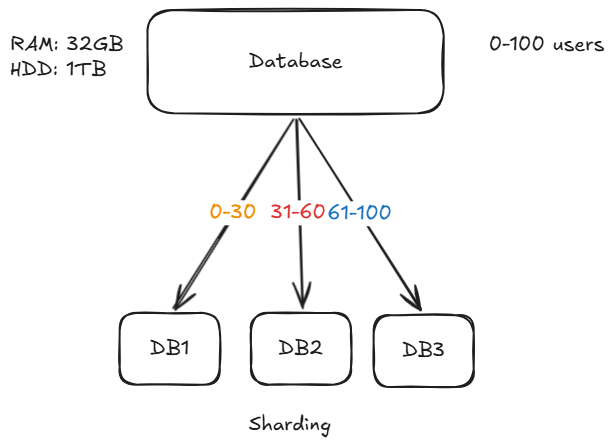
Understanding with an Example
Imaing ewe have a system with users having IDs from 0 to 100, and a single database is no longer able to handle all the traffic.
We divide the database into 3 shards:
- DB1 -> user_id 0-30
- DB2 -> user_id 31-60
- DB3 -> user_id 61-100
Now:
- A request with
user_id = 66-> goes to DB3 - A request with
user_id = 25-> goes to DB1
This way, each database handles only a portion of the total load.
How Requests Are Routed
To make sharding work, we need a way to decide:
“Which request goes to which shard?”
This is done using a sharding strategy.
Hash-Based Sharding (Using Modulo)
One of the simplest and most commonly used approaches is called hash-based sharding.
We apply a hash function to the user_id, and then use the modulo operator (%) to determine the shard.
Formula:
shard_number = hash(user_id) % N

Where:
N = number of shards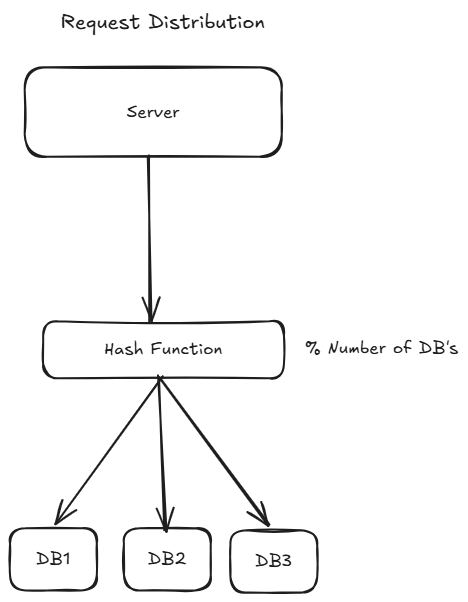
Example
Assume we have 3 shards (DB1, DB2, and DB3):
user_id = 33
hash(33) % 3 = 0 -> DB1

user_id = 78
hash(78) % 3 = 2 -> DB3
So:
- Output
0-> DB1 - Output
1-> DB2 - Output
2-> DB3
This ensures even distribution of data across shards.
Challenges in Sharding
Re-sharding Problem
If you increase shards (say from 3-> 4), the modulo changes:
hash(user_id) % 4
This causes most data to move, which is expensive.
Adding/removing shard -> massive reshuffling
If we add more shards:
old: hash(key) % 3
new: hash(key) % 4
It requires massive migration, when mode operator is changed almost all rows get affected.
The migration is massive if you have billions of record it would take hours in this process.
What Hashing Really Is
Hashing is the process of taking input data of any size or type and transforming it into a fixed-size value using a hash function.
That output is called a hash value, hash code, or digest.
hash("hello") -> 777
hash(4543534) -> 503
hash(true) -> 33
Key Properties:
1 Deterministic
The same input always produces the same output
2 Fixed Output Size
No matter the input size, the output has a constant size (depends on the hash function).
3 Fast Computation
Hash functions are designed to be efficient.
4 Collisions Are Possible
Different inputs can produce the same hash value.
Consistent Hashing
To solve the re-sharding problem, systems use consistent hashing.
Instead of directly usinng modulo:
- Data is distributed on a hash ring.
- Adding/removing a shard affects only a small portion of data.
Consistent hashing is a technique used in distributed systems to distribute data across nodes (servers) in a way that minimizes data movement when nodes are added or removed.
Why Normal Hashing Fails:
In simple hash-based sharding:
shard = hash(key) % NIf the number of servers (N) changes:
- Almost all keys get remapped
- Causes massive data reshuffling
- Leads to downtime or heavy load
This is the biggest limitation.
Core Idea of Consistent Hashing
Instead of mapping keys directly to servers:
Both server (nodes) and keys (data) are mapped onto the same hash space (ring).
Hash Ring
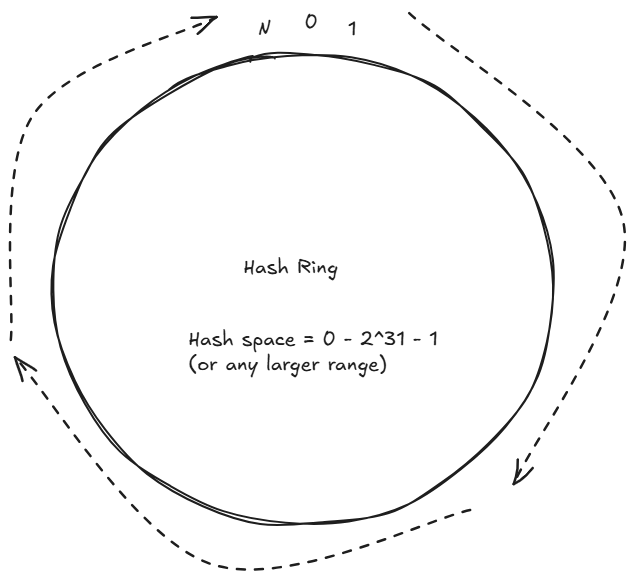
A hash ring is the core data structure used in consistent hashing. It's logical circular space where both servers (nodes) and data (keys) are placed after applying a hash function.
Instead of thinking in a straight line like:
0 → 1 → 2 → 3 → ... → NWe “wrap” this into a circle:
0 → 1 → 2 → ... → N → back to 0This circular structure is called the hash ring.
How the Hash Ring Works
1 Define the Hash Space
- Typically:
O to 2^32 - 1(or any large range) - Then imagine it as a circle
2 Place Servers on the Ring
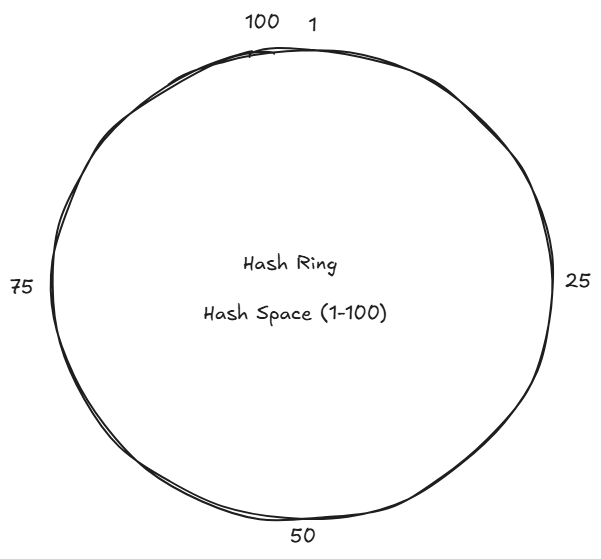
Each server (DB's server) is hashed to a position through some way like by its IP address.
hash(server's IP) => 1 to 100Suppose:
hash(DB1's IP) => 1
hash(DB2's IP) => 25
hash(DB3's IP) => 50
hash(DB4's IP) => 75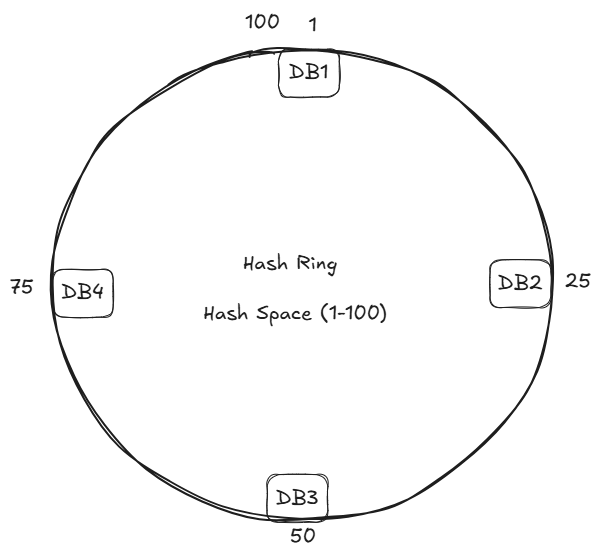
3 Place Keys on the Ring
Each key is also hashed:
hash(user_1) -> 20
hash(user_2) -> 60
hash(user_3) -> 95
hash(key0) -> 11
hash(key1) -> 41
hash(key2) -> 65
hash(key3) -> 80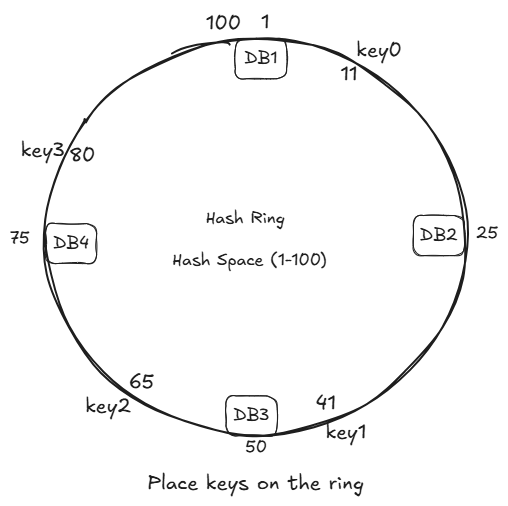
4 Key Assignment Rule
A key is assigned to the first server in clockwise direction
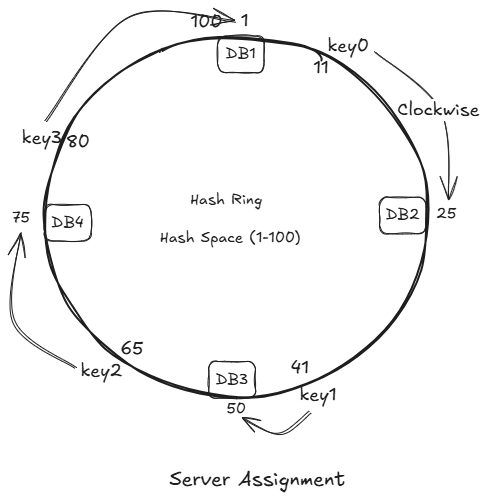
Examples:
key0 -> DB2
key1 -> DB3
key2 -> DB4
key3 -> DB1
Adding a New Server
Suppose we add new Database Server DB5.
If we hash it IP and it comes out to be 90.
We place the DB5 at place 90 and rehash to just key3.
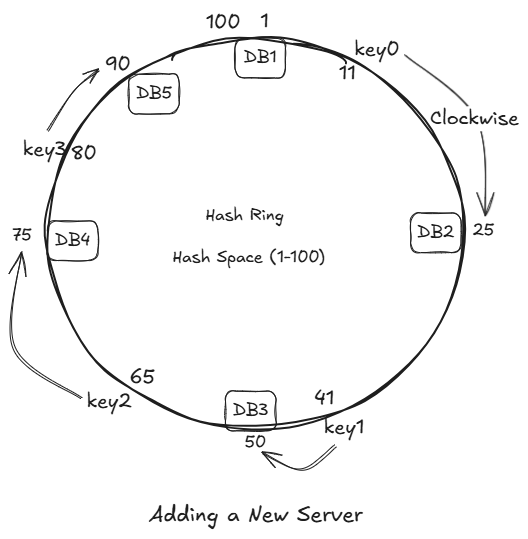
All we have to move is just key3, while all others remain unchanged.
Let's introduce DB6, its hash is 35.
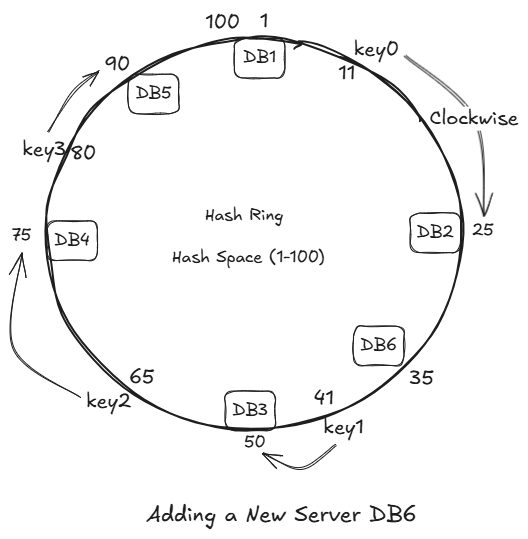
Introducing the DB6 does not impact any key's. As there were no keys between DB2 and DB6.
Removing a Server
If any server fails:
- Its keys move to next clockwise server.
- Again:
- Only a small subset is affected.
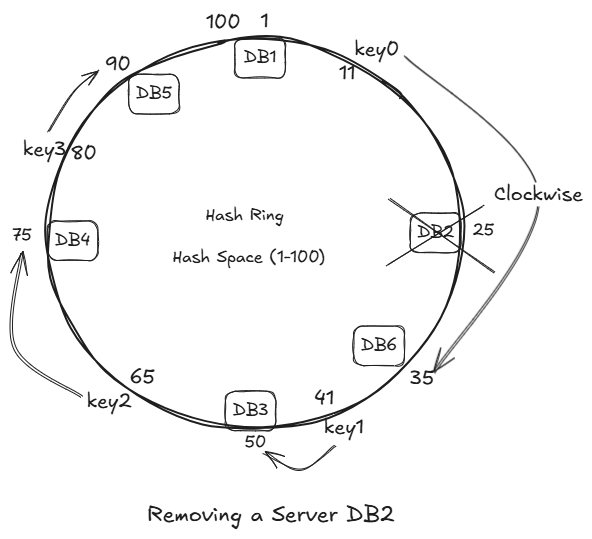
Only key3 is impacted, we just have to migrate it only.
Thus migration is minimized.
Limitations of Consistent Hashing
1 Uneven Distribution
Servers may not be evenly spaced on the ring leads to:
- Some servers overloaded
- Some underutilized
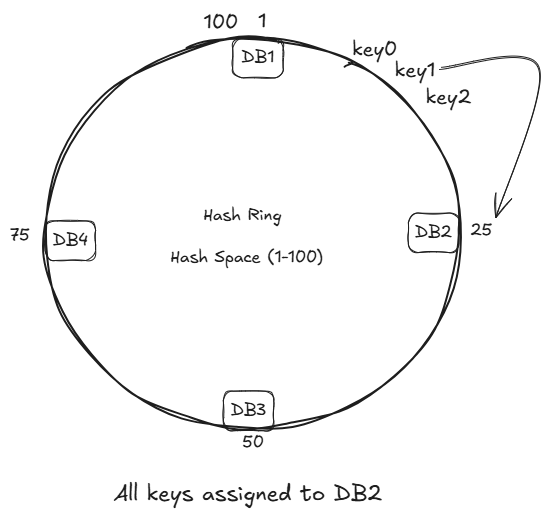
- The hash function should be good.
Solution: Virtual Nodes (VNodes) (Replicas of Original Nodes)
Virtual nodes are a technique used in consistent hashing to improve data distribution and load balancing across servers.
Virtual nodes are multiple logical representations of a single physical node in a hash ring.
Why Do We Need Virtual Nodes?
In basic consistent hashing:
- Each server is placed only once on the hash ring
- This can lead to uneven spacing
- Resulting:
- Some servers handle more data (hotspots)
- Other handle very little
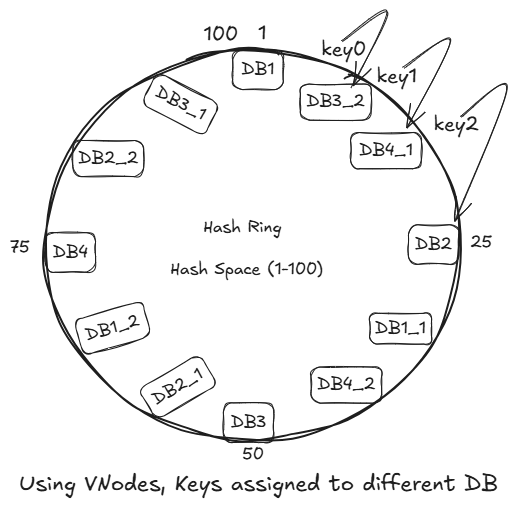
Every VNodes have different IP, thus different hash output.
2 Celebrity Problem (Hotspot Kkey Problem)
The hotspot key problem occurs when a single key (or small set of keys) received a disporportionately large number of requests, overloading the server (or shard) responsible for it.
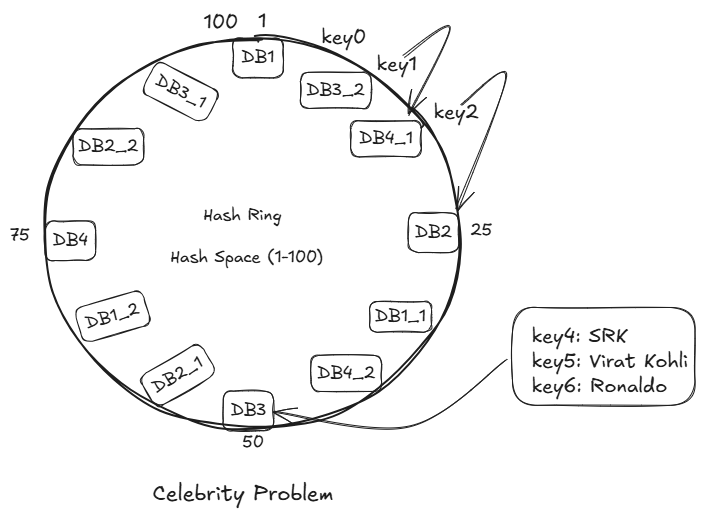
Below are the problem that happens:
Problems:
1 Storage Limitations
A single database cannot store unlimited data.
- DB is reaching TBs/PBs of storage
- Indexes become huge and slow
- Adding more disk/SSD is not enough
Sharding fixes it:
Split data across multiple DBs → each DB stores a small subset.
2 High Read/Write Throughput
A single server can handle only limited QPS (queries per second).
- Millions of users hitting the same DB.
- Writes create lock contention
- Reads overwhelm CPU and RAM
Sharding fixes it:
Each shard handles only a fraction of total traffic.
10 shards = 10x write throughput
10 shards = 10x read throughput
3 Large Index and Slow Queries
When DB grows too big:
- Index scans slow down
- Query latency increases
- Cache hit ratio decreases
Sharding fixes it:
Each shard's index is small -> queries are faster.
4 Hotspot / Hot Key Problem
Some keys become extremely active (e.g., popular users, trending items).
- One DB node gets all traffic for that user.
- Other DBs are idle – unbalanced load
Sharding distributed load evenly:
With good shard key -> no single node becomes overloaded.
5 Vertical Scaling Limit (Hardware Limit)
You cannot indefinitely upgrade.
- CPU
- RAM
- Storage
Eventually you hit the ceiling
Sharding fixes it:
Scale horizontally by adding more nodes without upgrading hardware.
6 Latency Optimization (Geographical Distribution)
Global users -> global latency.
- Users far away from DB region get slow responses.
Sharding fixes it:
Users are routed to the shard closet to them (geo-sharding).
7 Fault Isolation
If everything is stored in one DB:
- One failure -> full outage.
Sharding improves reliability:
If shard 3 fails:
- Only 1/N of users affected.
- Rest of the system works fine.
8 Cost Optimization
Large monolithic database need:
- bigger machines
- high-performance SSDs
- enterprise licenses
Sharding allows:
- Smaller cheaper machine
- Independent scaling
- Pay only for capacity needed
9 Backup & Restore Complexity
Backing up a huge monolithic DB:
- take hours
- impacts performance
- restoring takes even longer
With sharding:
- Each shard is smaller -> quicker to back up
- Can backup shards independetly
- Restore only the affected shard, not the whole database
10 Operational Maintenance
Maintenance on a monolithic DB affects the entire system.
Sharding helps:
- Rolling upgrades
- Per-shard maintenance
- Per-shard failover
- Zero-downtime schema changes
What is Sharding?
Sharding = Horizontal Partitioning
Instead of storing:
All users -> one DBWe split:
Shard 1 -> Users 1-1M
Shard 2 -> Users 1M-2M
Shard 3 -> Users 2M-3M
Each shard is a separate independent database (own CPU, RAM, disk)
This increases:
- capacity
- less index size
- smaller working set
- faster queries
Example – Users Table
| user_id | name | email |
|---------+------+-------+
|    1    |  A   |
|    2    |  B   |
|    3    |  C   |
|    4    |  D   |
If we use user_id % 2:
- Shard 1 gets rows: user 1, user 3
- Shard 2 gets rows: user 2, user 4
But in real systems, sharding is done at the database level:
Shard 1:
DB instance 1
Contains:
- users table (rows for shard 1)
- orders table (rows for shard 1)
- posts table (rows for shard 1)
Shard 2:
DB instance 2
Contains:
- users table (rows for shard 2)
- orders table (rows for shard 2)
- posts table (rows for shard 2)
So:
- same schema (tables)
- Different rows in each shard
How Data Is Distributed (Sharding Strategies)
There are 3 commonly used sharding methods:
1 Range-Based Sharding
Split data into ranges based on the shard key.
Example (user_id):
Shard 1 → 1 to 1,000,000
Shard 2 → 1,000,001 to 2,000,000
Shard 3 → 2,000,001 to 3,000,000
Pros:
- Very easy to implement
- Great for range queries
- Easy to understand
- Efficient for time-series data
Cons:
- Hotspot problem (sequential IDs go the latest shard)
- Uneven load distribution
- Need manual splitting when full
2 Hash-Based Sharding
Apply a hash on the shard key.
We pick a shard key – often:
user_idemaildevice_idorder_id
Then we compute:
shard_number = hash(shard_key) % total_shards
Example:
shard_id = hash(user_id) % 8
Pros:
- Uniform distribution
- No hotspots
- Simple static routing logic
Cons:
Adding/removing shard -> massive reshuffling
If we add more shards:
old: hash(key) % 4
new: hash(key) % 5
It requires massive migration, when mode operator is changed almost all rows get affected.
Fix: Use consistent hashing.
- Hard to scale dynamically
3 Directory-Based Sharding
Maintains a lookup table (metadata server) that stores:
user_id → shard_id
customer_id → shard_id
tenant_id → shard_id
The router fetches this mapping.
Pros:
- Very flexible
- Easy resharding (just update mapping)
- Shard key can be changed without changing DB logic
- Ideal for multi-tenant SaaS
Cons:
- Directory server must be highly available
- Adds a network hop
- Extra complexity
5 Geo-Sharding (Location-Based)
Users are placed based on geography.
Example:
Shard 1 → Asia
Shard 2 → Europe
Shard 3 → US East
Shard 4 → US West
Pros:
- Low latency for global users
- Complies with data residency laws (GDPR, etc.)
- Even naturally distributed traffic
Cons:
- Cross-region operations are expensive
- Hard if users travel globally
- Different shards = different consistency rules
6 Consistent Hashing
It is a smart sharding technique used to avoid massive data movement when scaling a distributed system (adding/removing servers).
It is used in:
- Databases
- Caches
- Load Balancers
- Distributed File Systems
Why Do We Need Consistent Hashing? (The rehashing problem)
If we have n db, a common way to balance the load is to use the following hash method:
serverIndex = hash(key) % n, where n is the size of the server pool.
Let us use an example to illustrate how it works.
Formula:
shard = hash(user_id) % 3
Let's say we insert these users:
| user_id | hash(user_id) | hash % 3 | Goes to |
|---|---|---|---|
| 101 | 754322 | 754322 % 3 = 1 | Shard1 |
| 202 | 123876 | 123876 % 3 = 0 | Shard0 |
| 303 | 987321 | 987321 % 3 = 2 | Shard2 |
| 404 | 453221 | 453221 % 3 = 1 | Shard1 |
So data is placed like this:
Shard0 → user 202
Shard1 → user 101, 404
Shard2 → user 303
This is normal modulo-based sharding.
What happens when you need to scale and add one more shard?
Say you add Shard3, so now n=4
Your formula becomes:
shard = hash(user_id) % 4
Now re-evaluate the keys:
| user_id | Old shard (mod 3) | New shard (mod 4) | Status   |
| ------- | ----------------- | ----------------- | -------- |
| 101     | 1                 | 754322 % 4 = 2    | MOVED ❌  |
| 202     | 0                 | 123876 % 4 = 0    | STAYS ✔️ |
| 303     | 2                 | 987321 % 4 = 1    | MOVED ❌  |
| 404     | 1                 | 453221 % 4 = 1    | STAYS ✔️ |
Out of 4 users, 2 moved (50%)
In real systems with millions of users:
- 50-80% of the data gets reshuffled
- Cache warmup is lost
- Databases overloaded
- Massive downtime for migration
In big clusters this becomes unmanageable.
This is the main drawback of hash-based sharding.
Why Does this Happen?
Because modulo depends on total number of shards:
key_location = hash(key) % NUMBER_OF_SHARDSIf NUMBER_OF_SHARDS changes -> every key's location changes.
This is why normal hashing does NOT scale horizontally.
Imagine a Hash Ring
Instead of using % n, we hash keys onto a circular space (0 degree -> 360 degree).
       (0°)
        |
 270° -- -- 90°
        |
       180°
Now servers (shards) are also hashed onto this ring.
Suppose we have 3 servers:
Server A → 40°
Server B → 120°
Server C → 300°
Placing Keys on the Ring
Example keys:
| Key | Hash | Point on ring |
|---|---|---|
| user_101 | 50° | 50° |
| user_202 | 130° | 130° |
| user_303 | 260° | 260° |
| user_404 | 310° | 310° |
Rule for Choosing Shard
Move clockwise and pick the next server you hit.
Example:
user_101 → 50° → next server clockwise = 120° (Server B)
user_202 → 130° → next server clockwise = 300° (Server C)
user_303 → 260° → next server clockwise = 300° (Server C)
user_404 → 310° → wrap → next server clockwise = 40° (Server A)
Final mapping:
Server A → user_404
Server B → user_101
Server C → user_202, user_303
This works fine – but the magic happens next.
What Happens When You Add a New Server?
Suppose you add Server at 200 degree.
Old: A (40°), B (120°), C (300°)
New: A (40°), B (120°), D (200°), C (300°)
Which keys move?
Only keys between B (120degree) and D (200degree)B.
That means:
- Only a small range of keys moves:
user_202 - All other users stays untouched
This is the superpower:
Adding a server only relocates keys in the server's segment, not the entire dataset.
Compared to modulo hashing where almost 80% keys move, here maybe 5-10% move.
Removing a Server
If Server B (120 degree) goes down:
Only the keys assigned to B will move -> to the next server clockwise (D in this case).
Everything else remains where it was.
Again -> minimal movement.
Key Distribution Problem & Virtual Nodes (Vnodes)
If you place servers randomly, distribution may be uneven:
- Server A may own 40% of the ring
- Server B only 10%, etc.
Solution: Virtual Nodes:
Each server is represented multiple times on the ring:
Server A: 100 virtual points
Server B: 100 virtual points
Server C: 100 virtual points
This gives:
- Perfect uniform distribution
- Smooth scaling
- Fine-grained rebalancing

Join the discussion
Sign in with your account to post comments, reply to others, and participate in the conversation.
Login to Comment