



Introduction
While the OSI model provided a conceptual framework, the TCP/IP model (also known as the Internet Protocol Suite) became the practical standard for networking.
It was developed in the 1970s by DARPA (Defense Advanced Research Projects Agency) as part of ARPANET’s growth. Its main strength was simplicity and practicality—it was designed to make real-world communication possible, not just theoretical.
Today, the Internet runs on TCP/IP, making it the most widely implemented networking model in the world.
Why TCP/IP Was Needed
- OSI was detailed but complex, and adoption was slow.
- The ARPANET community needed a working set of protocols to actually connect networks.
- TCP/IP solved the problem by focusing on robustness, interoperability, and efficiency.
Unlike OSI, TCP/IP was implemented, tested, and refined in real networks long before OSI gained traction.
The Four (Sometimes Five) Layers of TCP/IP
Layer 4: Application Layer
Role: Provides network services to user applications.
Functions: Defines how programs interface with the network.
Examples: HTTP, HTTPS, FTP, SMTP, DNS, DHCP, SNMP.
Notes: In TCP/IP, this combines OSI’s Application, Presentation, and Session layers.
Layer 3: Transport Layer
Role: Manages host-to-host communication.
Functions: Error detection, flow control, reliability.
Examples:
TCP (Transmission Control Protocol): Reliable, connection-oriented.
UDP (User Datagram Protocol): Fast, connectionless.
Notes: Similar to OSI Transport layer.
Layer 2: Internet Layer
Role: Handles logical addressing and routing of packets across networks.
Functions: Defines packet structure, logical addressing, path selection.
Examples: IP (IPv4, IPv6), ICMP, ARP, RARP.
Notes: Equivalent to OSI’s Network layer.
Layer 1: Network Access Layer (also called Link Layer or Host-to-Network)
Role: Defines how data is physically transmitted over the medium.
Functions: Addressing within the local network, error detection, hardware interface.
Examples: Ethernet, Wi-Fi (802.11), PPP, ARP.
Notes: Equivalent to OSI’s Physical + Data Link layers.
Data Encapsulation in TCP/IP
When data moves down the stack:
- Application Layer: Creates the message (e.g., an HTTP request).
- Transport Layer: Adds TCP/UDP header (segments/datagrams).
- Internet Layer: Adds IP header (packets).
- Network Access Layer: Encapsulates into frames with MAC address, then bits.
At the receiving end, the process is reversed (decapsulation).
Advantages of TCP/IP
- Practical and Tested: Designed for real-world networks, proven since the 1980s.
- Interoperable: Works across all hardware/software vendors.
- Scalable: From small LANs to the global Internet.
- Robustness: TCP/IP can handle failures and reroute traffic dynamically.
Introduction to TCP
At its core, building any application is about sending and receiving data. Whether it's a web app, a mobile app, or a backend service, everything eventually comes down to moving data from one machine to another over a network.
If you have built web applications, you have probably used APIs like fetch() or axios.post() to send a GET or POST request to a server. From a developer's point of view, it feels simple: you pass a URL, maybe a request body, and you get a response. But have you ever stopped to think about what actually happens under the hood? How does that data reliably travel across the internet and reach the correct server?
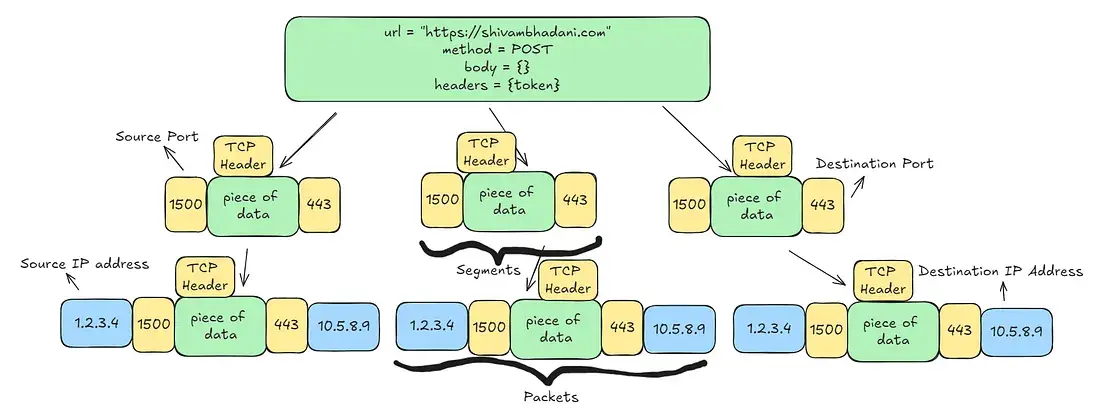
When you call axios.post() with a URL and a request body, the data is not sent as one large chunk. The internet is made up of physical media – wires, fiber-optic cables, Wi-Fi signals, radio waves – and each of these has limits on how much data can be transmitted at once. Because of these limits, the data must be broken down into smaller pieces before it can be sent.
Your HTTP request (which includes the URL, headers, and body) is split into small units. To each of these units, TCP adds its own information – such as the source port (sender) and destination port (receiver). At this stage, each unit is called a TCP segment.
Next, the network layer attaches the source and destination IP addresses to each segment. Once this happens, the segment becomes a packet. These packets then travel independently across the internet, hoping through routers and networks, until they reach the destination machine.
All of this happens over what logically call a TCP connection – a reliable communication channel that ensures data arrives completely, in order, and without corruption. TCP is the reason you can trust that a request sent from your application will reach the server exactly as intended.
How Does TCP Work
As discussed earlier, data is divided into multiple small units called segments. When an IP address is attached to these segments, they are called packets. These packets travel across the internet over a TCP connection.
Let's now see how TCP actually works in practice.
Sending data over a TCP connection happens in three distinct phases:
- Connection Establishment (Three-Way Handshake)
- Data Transfer
- Connection Termination (Four-Way Handshake)
Each phase exists to ensure reliability, correctness, and clean communication between two machines.
1 Connection Establishment (Three-Way Handshake)
Before any data can be exchanged, TCP must establish a connection between the client and the server. This is done using the three-way handshake.
Step 1: SYN (Synchronize)
Initiation:
The client wants to start a connection with the server. It sends a TCP segment with the SYN flag set.
- The SYN flag is a control flag in the TCP header.
- This segment also contains the client's initial sequence number, say
Seq = X.
In simple terms:
The client is saying to the server:
“Hey server, I want to establish a connection with you.”
Step 2: SYN-ACK (Synchronize + Acknowledge)
Response:
When the server receives the SYN segment, it responds with a segment that has two flags set:
- SYN: The server is willing to establish the connection.
- ACK: The server acknowledges the client's request.
Details:
Ack = X + 1(acknowledging the client's sequence number)- The server also sends its own initial sequence number, say
Seq = Y.
In simple terms:
The server is saying:
“I received your request, and I'm ready to establish the connection too.”
Step 3: ACK (Acknowledge)
Completion:
The client receives the SYN-ACK and a final ACK back to the server.
Ack = Y + 1(acknowledging the server's sequence number)
At this point:
- Both sides know each other's sequence numbers
- Both sides agree the connection exists
In simple terms:
The client is saying:
“Great, let's start communicating.”
The TCP connection is now established, and data transfer can begin.
2 Data Transfer
Once the three-way handshake is complete, both the client and the server can start sending data.
Segmenting Data:
- Large data is split into smaller TCP segments
- Each segment is assigned a sequence number
- Sequence numbers allow TCP to:
- Maintain correct order
- Detect missing data
- Reassemble data correctly at the receiver
For example, if a client wants to send 1000 bytes of data, TCP may divide it into multiple segments, each carrying a portion of the data.
Acknowledgments (ACKs)
- The receiving side sends back ACKs to confirm which data has been received.
- An ACK does not acknowledge a packet – it acknowledges bytes.
- ACK = N means:
- "I have received all bytes up to
N-1. Send me byteNnext.
- "I have received all bytes up to
Reliability and Retransmission
If:
- A segment is lost
- A segment arrives corrupted
- An ACK is not received in time
Then:
- TCP retransmits the missing data
- This guarantees reliable delivery, even over unreliable networks
This is one of TCP's most important responsibilities.
3 Connection Termination (Four-Way Handshake)
Once data transfer is complete, TCP must close the connection gracefully. This is done using a four-way handshake.
Step 1: FIN
- The client sends a FIN (Finish) segment to the server.
- This means the client has no more data to send.
In simple terms:
“I am done sending data.”
Step 2: ACK
- The server acknowledges the client's FIN by sending an ACK.
In simple terms:
“I received your close request.”
Step 3: FIN (from server)
- The server sends its own FIN segment when it is done sending data.
In simple terms:
“I am also done sending data.”
Step 4: ACK
- The client acknowledges the server's FIN.
- The connection is now fully closed.
Why Four-Way Handshake?
You might wonder why:
- Connection setup uses three steps
- Connection termination uses four steps
The reason is that TCP is full-duplex:
- Client and server can send data independently
- Each side must close its sending channel separately
During connection establishment:
- The server combines SYN + ACK into one packet
During termination:
- Each FIN must be acknowledged independently
- This ensures all data is fully delivered before closing
Understanding TCP through visualization
Notation used in this section:
- Seq: Sequence Number
- The byte number of the first byte being sent
- Ack: Acknowledgment Number
- The next byte the receiver expects
- SYN: Synchronize flag
- Used to initiate a TCP connection
- ACK: Acknowledgment flag
- Used to acknowledge received data
- FIN: Finish flag
- Used to terminate a TCP connection
Connection Establishment (Three-Way Handshake)
Let's understand the three way handshake using actual numbers so you can visualize what's happening:
Initial Setup
- Client's Initial Sequence Number (ISN):
1000 - Server's Initial Sequence Number (ISN):
2000
In real systems, these numbers are chosen randomly for security reasons. We are using fixed numbers only for understanding.
Step 1: Client Sends SYN to Server
The client wants to establish a TCP connection, so it sends a TCP segment with the SYN flag set.
- Seq = 1000
- Flags = SYN
This packet does not carry application data. It is only used to initiate the connection.
In simple words:
The client is saying:
“Server, I want to start a connection. My starting byte number is 1000.”
Step 2: Server Sends SYN-ACK to Client
The server receives the SYN packet and responds with a segment that has both SYN and ACK flag set.
- Seq = 2000 (server's own starting number)
- ACK = 1001 (client's sequence number + 1)
- Flags = SYN, ACK
Why Ack = 1001?
Because:
- The SYN itself consumes one sequence number
- ACK always means:
- “I have received everything up to byte 1000, send me byte 1001 next”
In simple words:
The server is saying:
“I received your connection request. I am ready too. My starting number is 2000.”
Step 3: Client Sends ACK to Server
The client received the SYN-ACK and sends a final ACK back to the server.
- Seq = 1001
- ACK = 2001 (server's sequence number + 1)
- Flags = ACK
Why Ack = 2001?
Because:
- The server's SYN also consumes one sequence number
- The client is acknowledging the server's SYN
In simple words:
The client is saying:
“I have received your response. Let's start sending data.”
Data Transfer
Assumption
The client wants to send the string “Hello World”, which we assume is 4000 bytes.
TCP breaks this data into segments:
- Segment 1: 2000 bytes ("Hello")
- Segment 2: 2000 bytes ("World")
Segment 1: Client -> Server
- Seq = 1001
- Data length = 2000 bytes
Why 1001?
- 1000 was used for the SYN
- So actual data starts from 1001
ACK for Segment 1: Server -> Client
The server successfully receives bytes 1001-3000.
- ACK = 3001 (1001 + 2000)
This means:
“I have received everything up to bytes 3000. Send me byte 3001 next.”
Segment 2: Client -> Server
- Seq = 3001
- Data length = 2000 bytes
Why 3001?
- Because the server acknowledged up to 3000
ACK for Segment 2: Server -> Client
The server receives bytes 3001-5000.
- ACK = 5001 (3001 + 2000)
This means:
“I have received all 4000 bytes successfully.”
At this point:
- Data transfer is complete
- The connection is still open
Connection Termination: The Four-Way Handshake
TCP closes connections gracefully, ensuring that:
- All data is delivered
- Both sides agree to close
Unlike connection setup, closing requires four steps, because TCP is full duplex.
Step 1: Client -> Server (FIN)
The client signals that it has finished sending data.
- Seq = 5001
- Flags = FIN
The FIN flag consumes 1 sequence number.
Meaning:
“I have no more data to send.”
Step 2: Server -> Client (ACK for FIN)
The server acknowledges the client's FIN.
- ACK = 5002 (5001 + 1)
Meaning:
“I acknowledge that you are done sending data.”
At this stage:
- Client -> Server direction is closed
- Server -> Client direction is still open
Step 3: Server -> Client (FIN)
When the server is also ready to close, it sends its own FIN.
- Seq = 2001 (server's last sequence number after handshake)
- Flags = FIN
Step 4: Client -> Server (ACK for Server FIN)
The client acknowledges the server's FIN.
- ACK = 2002 (2001 + 1)
Meaning:
“I acknowledge that you are done as well.”
Connection is now fully closed.

Join the discussion
Sign in with your account to post comments, reply to others, and participate in the conversation.
Login to Comment